


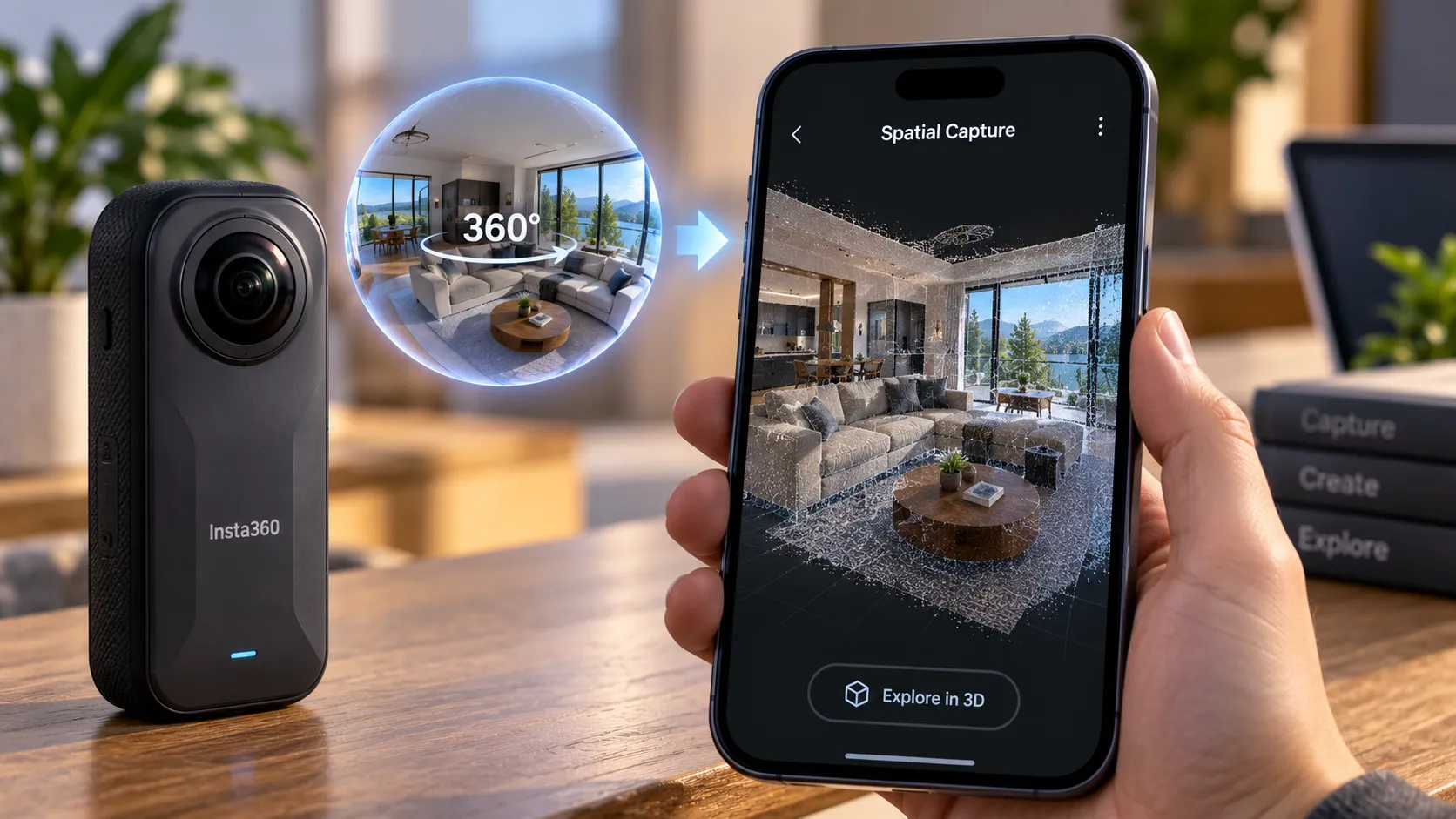
Insta360 will launch Spatial Capture in the United States on September 28, a feature that converts standard 360-degree footage into 3D scenes people can explore from different positions inside the company's mobile app.
The feature runs on 3D Gaussian Splatting, or 3DGS, a reconstruction method that uses image or video data to rebuild a real-world space as an explorable 3D scene. Insta360 is folding that process into a simplified workflow inside an app it already ships to camera owners. Insta360's current X6 product page
The US rollout isn't tied to a new camera purchase. Launch coverage names the X6, X5, and X4 Air as supported cameras on September 28. Insta360's broader current product documentation also lists the X4 in select Spatial Capture modes, although that page doesn't make clear whether X4 support applies to the initial US rollout on the same date.
Users get four free 3D scene generations each month.
That free tier has more defined rules than the earliest launch coverage suggested. Insta360 says the allowance resets on the first day of each month, and newer versions of the app can use the company's Diamond currency for additional generations after the four free uses are gone.
Each extra Spatial Capture generation costs 50 Diamonds. Because Diamond pricing can depend on how they're obtained or purchased, there isn't one simple published US-dollar price per fifth scene.
Footage still has to go through cloud reconstruction, and each source clip is limited to two minutes.
Those constraints, plus the shooting conditions Insta360 now recommends, matter as much as the one-tap promise.
Insta360 Spatial Capture: From Looking Around to Moving Through
A standard 360 video lets someone look in any direction from wherever the camera was positioned.
Spatial Capture goes further.
The reconstructed scene can be explored from different positions and viewing angles rather than keeping the viewer locked to the original camera point.
That's the distinction between looking around inside a spherical recording and navigating a reconstructed 3D environment.
Traditional 3D reconstruction workflows often require deliberately capturing a space from many viewpoints, then processing those images or videos with specialized software.
Insta360's pitch is that a 360 camera already captures every direction at once, making the source footage easier to collect.
That doesn't mean any random 360 clip will produce a good result.
Insta360's own current support documentation recommends walking through the area in a deliberate pattern so the camera covers it from multiple viewpoints.
For better reconstruction, Insta360 recommends:
A clearly defined indoor or outdoor space.
Good lighting.
An area of roughly 100 square meters or less.
Slow, steady movement.
An S-shaped or back-and-forth walking route through the space.
Keeping passes through the area less than about 2 meters apart.
8K/30fps 360 video where available.
The company specifically advises against high-speed movement, driving, cycling, very dark environments, or scenes filled with large numbers of moving people or objects.
So the workflow is simpler than a traditional manual 3D scan, but the way the footage is captured still matters.
What Gaussian Splatting Actually Builds
3D Gaussian Splatting uses images or video frames to reconstruct a viewable 3D representation of a real space.
In Spatial Capture, the result is a scene that can be navigated in the Insta360 app rather than just replayed as a normal 360 video.
Insta360 describes the feature as a way to revisit an object or space and move through it from different viewpoints after the original recording is finished.
What the company doesn't provide is an objective accuracy specification for the reconstruction.
There's no published measurement for geometry accuracy, fine-detail retention, color consistency, or how closely a finished scene matches the physical space.
That still leaves independent testing with an important job after the US launch.
How Insta360 Turns 360 Video Into a 3D Scene
The core workflow is short.
Record compatible 360 video, open the Spatial Capture section in the Insta360 app, select the footage, and tap Generate.
If the clip is longer than two minutes, the app requires you to trim it before generation.
The source material also has to come from supported normal 360 video modes.
Insta360's current support documentation says Spatial Capture does not support every recording mode. Unsupported material includes certain specialized modes such as slow motion and moving timelapse, along with photos and some color-altering capture modes including Dolby Vision and I-Log.
For locally stored footage, the app first processes the source on the device before uploading it for cloud reconstruction.
Insta360 says 8K/30fps is the recommended source format.
Once cloud generation begins, the app estimates roughly 90 minutes for processing, although higher-resolution footage can take longer.
Launch coverage describes the practical window more broadly as around one to two hours.
Users don't have to leave the generation page open for that entire cloud-processing period. The app can send a notification when the reconstruction is finished.
How You Explore and Share the Finished Scene
Once generation finishes, Insta360 lets users move around the reconstructed space using the phone's controls.
The current support guide documents gyroscope and joystick viewing modes.
Users can change position and viewing direction, rather than only rotating around the original camera position.
There is one meaningful limitation: vertical navigation isn't currently supported.
Insta360 says Spatial Capture allows movement across a horizontal plane but doesn't currently support moving upward or downward through a scene, such as climbing stairs or navigating vertically through a multi-level space.
That makes the current feature a better fit for a room, studio, exhibition space, store floor, or other mostly level environment than a multistory property.
Sharing comes in two forms.
A generated 3D scene can be shared through a web link that another person opens in a browser.
Insta360's current support documentation says those links remain valid rather than expiring automatically.
Users can also create a conventional flat video from the reconstruction using effects or a guided path through the scene, then share that video like any other clip.
The underlying 3D scene itself can't currently be downloaded as a source file or exported for offline editing in another 3D application.
Insta360 also says generated scenes are tied to the account that created them and don't currently support offline export.
What the Convenience Costs
Every account receives four free Spatial Capture generations per month.
Unused generations do not roll over.
The allowance resets on the first day of each month.
Once those free generations are exhausted, Insta360's current documentation says additional generations can use its Diamond currency, with each scene costing 50 Diamonds.
If a generation fails because of a network or server problem, Insta360 says the generation credit is returned.
If the user manually cancels a generation after it has started, the credit currently isn't refunded.
That is more specific than the original launch reporting, which left the fifth-generation behavior unresolved.
It still doesn't translate neatly into a fixed dollar-per-scene price because the cost of acquiring Diamonds can vary.
Where This Fits: Three Realistic Use Cases
Insta360 has pointed to uses including studios, exhibitions, stores, travel, and preserving spaces people may want to revisit later.
The company's current shooting guidance gives those examples more useful boundaries.
Small Spaces and Exhibitions
Studios, shops, exhibitions, and individual rooms make sense because they fit the recommended limited-area workflow and can usually be captured on one level.
A browser-based link also makes it possible to share the resulting scene without asking the viewer to install the Insta360 app.
Real Estate and Property Previews
Real estate remains a plausible use case, but the limitations matter.
The recommended capture area is roughly 100 square meters or less, and the current system doesn't support vertical movement through stairs or multiple floors.
That makes Spatial Capture more immediately suited to individual rooms, apartments, or selected spaces than to replacing a complete professional property-scanning workflow.
Creator and Event Content
Creators can build a custom path through the 3D reconstruction and export the result as a conventional video.
That gives them a middle ground between asking viewers to explore an interactive scene themselves and publishing ordinary camera footage.
Event coverage may also work, but Insta360's own documentation warns that scenes with large numbers of moving people aren't ideal reconstruction targets.
What Insta360 Already Says About Difficult Scenes
Several limitations that looked unanswered in early launch coverage are now documented.
Insta360 specifically identifies these as weaker scenarios:
Low-light spaces.
Fast movement.
Driving or cycling.
Large numbers of moving people or objects.
Very large capture areas.
Vertical environments that require moving between floors.
The company also says its people-removal and scene-navigation behavior are still being optimized.
That matters because reconstructed people can create visual artifacts, and Insta360 itself acknowledges that automatic person removal can sometimes produce incomplete results.
The company labels Spatial Capture as still under active development and says its terms can change.
What Still Needs Independent Testing
The official documentation answers more workflow questions than the early launch stories did, but it doesn't answer the biggest quality questions.
Independent testing still needs to show:
How fine detail survives reconstruction.
How reflective or transparent surfaces behave.
How badly low light affects the finished scene.
Whether moving people leave distracting artifacts.
How accurately objects retain their geometry.
How quickly visual gaps appear near the edges of the captured area.
Whether X6 footage produces meaningfully better reconstructions than X5 or X4 Air footage.
The generated scene also has limits beyond image quality.
There's no VR-headset viewing support documented today, no downloadable 3D source file, and no offline export of the interactive model.
Those restrictions keep Spatial Capture closer to an Insta360-hosted viewing and creation tool than an open 3D reconstruction workflow.
What the Cloud Workflow Still Doesn't Explain Clearly
Spatial Capture relies on cloud reconstruction.
Insta360 documents that locally selected footage is prepared on the phone and uploaded to the cloud, and it says temporary generation files on the phone are removed after that upload.
What the available Spatial Capture documentation doesn't clearly spell out is a simple retention schedule for the uploaded source footage and generated cloud scene.
That's different from saying Insta360 provides no privacy policy at all.
It means anyone scanning sensitive interiors, workplaces, private homes, or commercial spaces should read the current Insta360 cloud and privacy terms before treating the feature as a local-only workflow.
The interactive result is also account-bound and hosted for online viewing, so this isn't the same as generating a private 3D file entirely on a phone or desktop computer.
What to Watch After September 28
The September 28 US rollout settles what Spatial Capture is designed to do.
It doesn't settle how well it does it.
Early independent testing should answer what the official documentation can't: how the reconstruction performs in real rooms under ordinary lighting, how much detail survives across the X6, X5, and X4 Air, how well moving subjects are removed, and how quickly geometry breaks down when a viewer moves away from well-captured areas.
The pricing question is narrower now too.
The first four scenes each month are free, and Insta360 documents 50 Diamonds per additional generation after that.
What users still need to judge is whether the quality and workflow make those extra generations worth paying for.
For now, Spatial Capture looks less like a replacement for professional 3D scanning and more like an unusually accessible way to turn carefully shot 360 footage into a navigable memory, room preview, or creator asset.
The real test starts when US users can generate those scenes themselves on September 28.


Comments
Be the first, drop a comment!